
Learn how to deploy and secure MCP servers at scale using Google Cloud Run and Apigee. Explore authentication, governance, traffic management, and tiered access to MCP tools.
1. Introduction: MCP Adoption is Accelerating
Imagine you’re a developer building applications powered by large language models. You’ve heard of the Model Context Protocol (MCP), the new way to connect LLMs with external systems and APIs. It feels like magic — your model can now search a database, call an API, or even manage a SaaS application in real time.
What is MCP?
The Model Context Protocol (MCP) is an open standard that defines how large language models (LLMs) communicate with external tools, APIs, and data sources. MCP servers expose “tools” — structured operations like querying a database or updating a record — which MCP clients (such as LLM-powered apps) can discover and invoke. This creates a common, extensible way to bridge AI models with real-world systems.
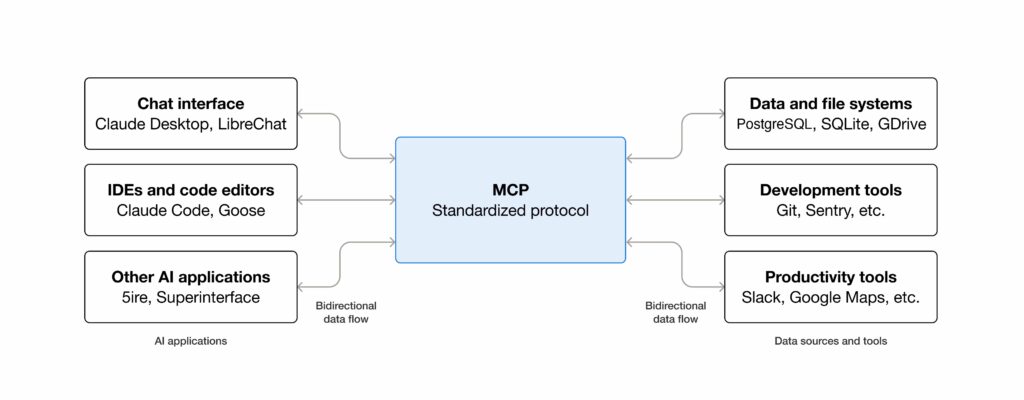
But then reality sets in.
Running a quick MCP server locally is easy. Running it securely, at scale, across your organization? That’s another story. You need a way to deploy MCP servers quickly, handle traffic spikes, protect sensitive tools, and decide who gets to use which tool.
This is where Google Cloud Run and Apigee come in. Together, they form a reference architecture for enterprises to deploy MCP servers at scale, secure them, and expose them to MCP clients in a governed way.
2. The Challenge: From Prototype to Enterprise Scale
Running an MCP server on your laptop is fine for demos. But production systems demand more:
- Scalability: handle unpredictable workloads across multiple teams.
- Security: only allow authorized MCP clients to invoke tools.
- Governance: ensure consistent policies, compliance, and access control across all MCP servers, with auditability and enterprise-wide standards.
- Granular access control: expose only the tools each MCP client is entitled to.
- Discoverability: developers need a central place to find available MCP servers, understand what tools they provide, and onboard with the right credentials.
- Guardrails and policy enforcement: prevent “tool sprawl” and ensure MCP adoption remains consistent and compliant.
To solve these challenges, we designed a reference architecture that combines Google Cloud Run for scalable MCP server deployment with Apigee for secure, governed, and discoverable access.
3. Cloud Run: The Ideal Runtime for MCP Servers
When it comes to running MCP servers in production, Google Cloud Run is an almost perfect fit. It provides a fully managed, serverless environment that removes the operational burden of managing infrastructure, while giving developers speed, scale, and security.
Key Benefits of Cloud Run for MCP Servers
- Rapid deployment: Deploy a containerized MCP server in minutes. Containerize your code, push to Artifact Registry, and deploy with a single command.
- Autoscaling (including to zero): Cloud Run scales automatically with demand. No traffic? Scales to zero. Sudden spike? New instances spin up instantly.
- Multi-language and container flexibility: MCP servers can be written in any language (Python, Node.js, Go, Java, .NET, or even custom binaries).
- Centralized and shareable: Instead of every developer running their own server, Cloud Run hosts one deployment accessible to all clients.
- Secure by default: Cloud Run requires authenticated invocations. By granting the Cloud Run Invoker role only to Apigee’s service account, Apigee becomes the only entry point.
- Secure credential management — Cloud Run can leverage Cloud Secret Manager to retrieve access credentials needed to interact with and authenticate to backend systems or APIs.
- Cost efficiency: Billing is per request and per 100ms of usage. Idle servers cost nothing, making it ideal for workloads with bursty traffic.
4. Apigee: The Secure and Discoverable Front Door for MCP Servers
While Cloud Run is excellent for deploying MCP servers, you don’t want to expose those servers directly to the public internet. This is where Apigee steps in as the secure API management layer.
Apigee acts as the front door to your MCP servers, ensuring all client traffic is authenticated, authorized, governed, and discoverable before it ever reaches Cloud Run.
Key Benefits of Apigee for MCP
- Authentication and authorization: Supports API keys, OAuth 2.0, JWT validation, and enterprise SSO.
- API Products for access control: Group MCP tools into Basic, Advanced, or Premium tiers. Each API key maps to a product, giving MCP clients access only to entitled tools.
- Traffic management: Apply quotas to cap usage and rate limits to prevent abuse. Protect MCP servers from overload and ensure fair usage.
- Enterprise security: Apigee uses a Google Cloud service account identity to call Cloud Run. Cloud Run only accepts authenticated calls from that account, preventing bypass.
- Analytics: Monitor real-time usage, latency, and errors. Critical for adoption insights and troubleshooting.
- Developer portal and discoverability: Publish MCP servers and tools in a browsable catalog. Developers can request access, view documentation, and self-onboard. This solves the challenge of discoverability and prevents duplicate effort across teams.
- Governance and guardrails: Apigee enforces policies consistently across all MCP servers, ensuring compliance, auditability, and uniform standards for tool access.
- Composable MCP architecture: Instead of building one large “agent monolith,” enterprises can deploy multiple smaller, domain-specific MCP servers (e.g., Shopify, Salesforce, Databases) on Cloud Run. Apigee unifies them into a coherent ecosystem through policies and API products.
- Monetization ready: Package MCP tools into paid products for external partners or advanced internal tiers.
5. Reference Architecture
To address the challenges outlined above — scalability, governance, security, and discoverability — we designed a reference architecture that brings together Google Cloud Run and Apigee. Cloud Run provides the serverless runtime for deploying MCP servers at scale, while Apigee sits in front as the secure API management layer that enforces policies, controls tool-level access, and makes MCP servers discoverable through its developer portal.
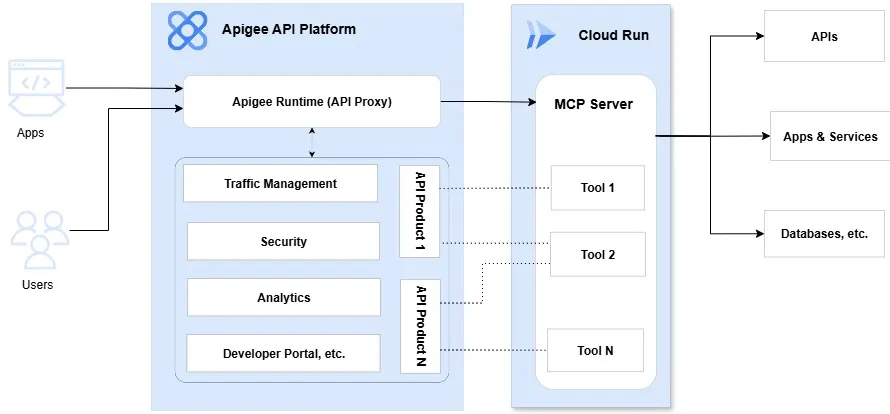
To make this architecture concrete, let’s walk through the end-to-end flow of how an MCP client (or LLM) interacts with an MCP server when fronted by Apigee. We’ll start with the developer onboarding process, then cover authentication, tool discovery, invocation, and response handling.
Prerequisite: Developer Onboarding via Apigee Developer Portal
- A developer browses the Apigee developer portal to discover available MCP servers and their tools.
- The developer creates an App in the portal, subscribes to the appropriate API Product(s), and obtains an API key or token.
- This API key defines which tools and usage policies the client will be entitled to.
The Flow
Step 1: MCP Client → Apigee
The client calls Apigee instead of Cloud Run directly. The request includes the API key or token obtained from the developer portal.
Step 2: Authentication & API Product Resolution
Apigee validates the credential. Based on the API key/token, Apigee determines which API Product is being used. Each API Product can define custom attributes such as allowed_tools.
Step 3: Tools Discovery (tools/list)
MCP clients typically call tools/list first to discover what MCP tools available. This request is authenticated and passed to the Cloud Run MCP server.
Apigee filters the returned tool list based on the allowed_tools attribute, showing only the tools the client is entitled to use.
Step 4: Tool Invocation Requests
When the client tries to invoke a tool:
- Apigee extracts the tool name from the request (e.g.,
$.params.name) - Apigee checks the requested tool against the
allowed_toolsattribute of the API Product - If allowed, the request is forwarded to the Cloud Run MCP server
- If not allowed, Apigee rejects the request with an access denied error
Step 5: Cloud Run MCP Server Execution
Allowed requests reach the MCP server running on Cloud Run. The server executes the tool logic, connecting to downstream APIs, databases, or SaaS systems as needed.
Credentials are securely retrieved from Google Secret Manager, never hardcoded or stored in environment variables.
Step 6: Response Handling
The MCP server returns a response to Apigee. Apigee enforces any quotas, rate limits, or policies before passing the response back to the client.
6. Demo: Shopify MCP Server
To bring this architecture to life, we built a Shopify MCP server as a working demo.
Implementation Details
Runs on Cloud Run, connecting to Shopify via GraphQL APIs. The server implements four tools:
search_products— Search products by keyword (Basic tier)get_product_details— Retrieve full product information (Basic tier)duplicate_and_optimize— Clone a product and apply SEO optimization to the draft copy (Advanced tier)optimize_product— Apply SEO optimization directly to an existing product (Advanced tier)
Exposed through Apigee, which enforces API key authentication and tool-level access control.
API Products for Tiered Access
We created two tiers:
Basic (10 requests/second): Read-only access for discovering and viewing products.
allowed_tools: "search_products,get_product_details"
Advanced (30 requests/second): Complete access to all tools including write operations.
allowed_tools: "*"
Testing with Claude Desktop
We tested with Claude Desktop, which automatically discovers tools available based on the client’s API key.
When a Basic tier user calls tools/list, they only see the two read-only tools. When they attempt to invoke a write operation like optimize_product, Apigee blocks the request before it reaches Cloud Run.
🎥 Watch the demo here:
7. Conclusion
As MCP adoption grows, enterprises need architectures that are scalable, secure, governed, and discoverable.
Cloud Run enables rapid, serverless deployment of MCP servers with autoscaling and IAM-based security.
Apigee ensures governed exposure, with authentication, quotas, analytics, tiered access, and developer portal discoverability.
Together, they deliver a blueprint for enterprise-grade MCP adoption.
The Shopify demo shows this in action: Cloud Run handles deployment and scaling, Apigee enforces governance and tool-level access control, and MCP clients provide a seamless end-user experience.
This pattern can extend to any backend — from SaaS platforms like Salesforce and HubSpot to internal databases and APIs — enabling enterprises to securely unlock the full potential of MCP.
Interested in implementing this architecture? Have questions? Feel free to contact me.